

MyAI answers every call, day or night
The AI receptionist for your business phone. It answers in English, French and other languages, books appointments, takes messages and hands callers to your team.
- Answers 24/7
- English, French & more
- Google Calendar & Outlook

01 / 04
On every callA receptionist that never misses a call
MyAI answers, understands the caller and gets things done while your team keeps working.
- Answers every callDay or night, weekends and holidays, without a queue.
- Your callers’ languageEnglish and French on the same call: MyAI follows the caller. Assistants in other languages, such as Arabic, can be set up too.
- Books appointmentsStraight into your Google Calendar or Outlook calendar, for each service and each person in your company.

CallerHi, are you open this Saturday?
MyAIYes, from 9 to 5. Would you like me to book you a visit?
CallerYes, 10 a.m. please.
MyAIYou’re booked for Saturday at 10. I’ll transfer you to Julie for the rest.
Illustration of a MyAI call (sample conversation).
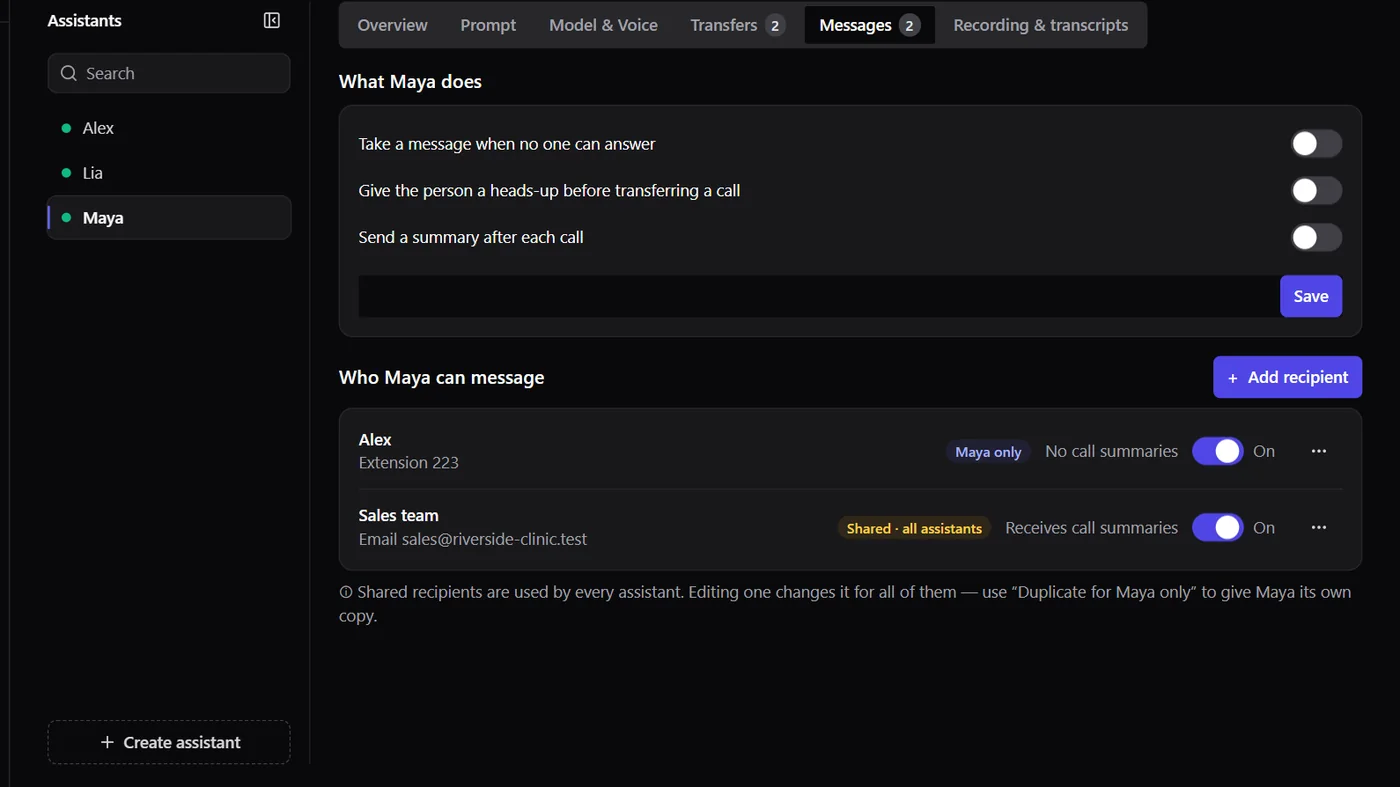
Real MyAI screen shown with a demo account.
02 / 04
Your teamThe right person, at the right moment
You decide where MyAI may send a call and who gets its messages.
- Transfers the callerTo an extension, a voicemail box or an outside phone number.
- Briefs your colleague firstMyAI takes notes during the call and texts them to your colleague before it transfers the caller.
- Takes a messageWhen no one can answer, MyAI takes the message and sends it to your team: as a chat message in the Telephonica app, or by email.
03 / 04
After the callEvery conversation, in writing
Nothing a caller said gets lost between the call and your team.
- TranscriptsRead what the caller and MyAI said, line by line.
- Call summariesA summary of the whole conversation after each call, in the Telephonica app or by email, for the people you choose. A supervisor can use it for coaching.
- MessagesEvery message MyAI took, with the caller’s number.
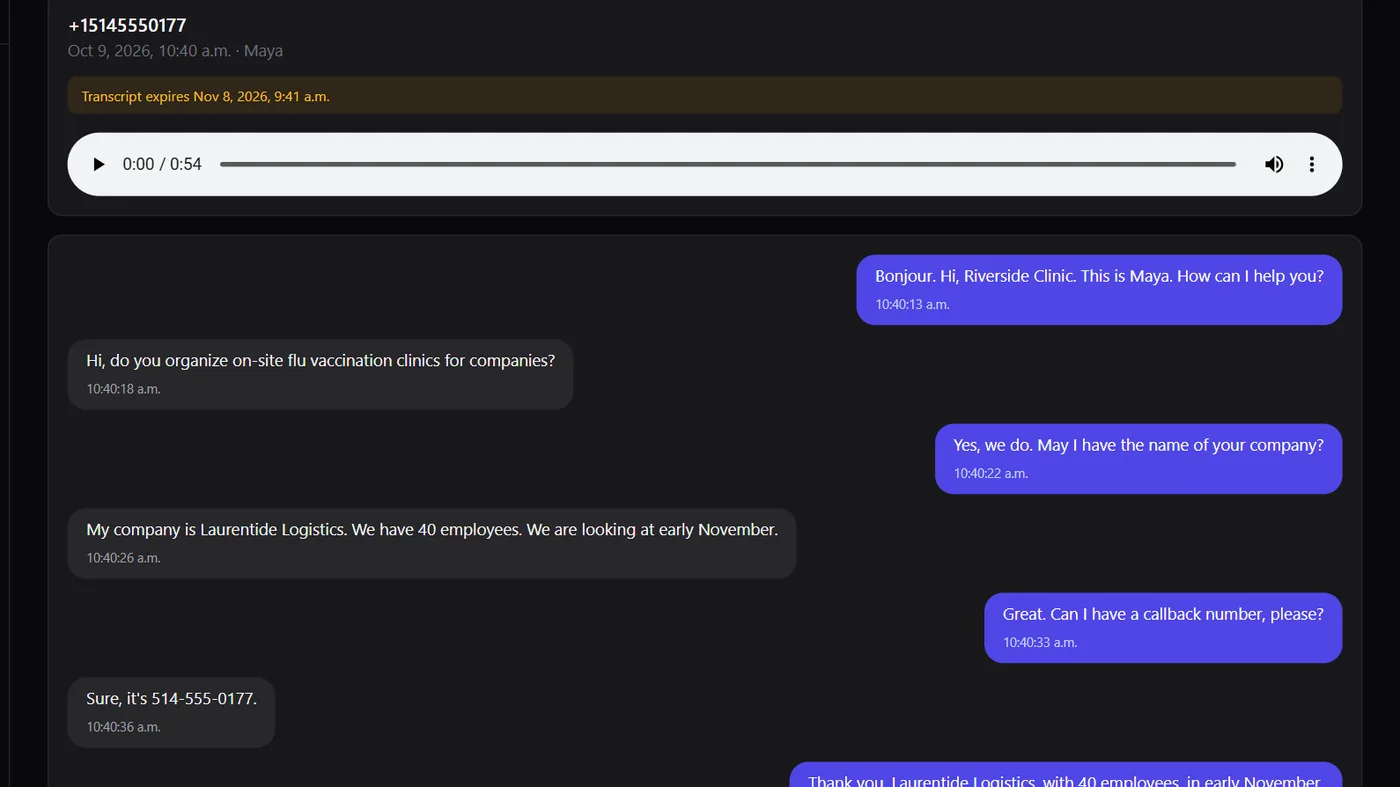
Real MyAI screen shown with a demo account.
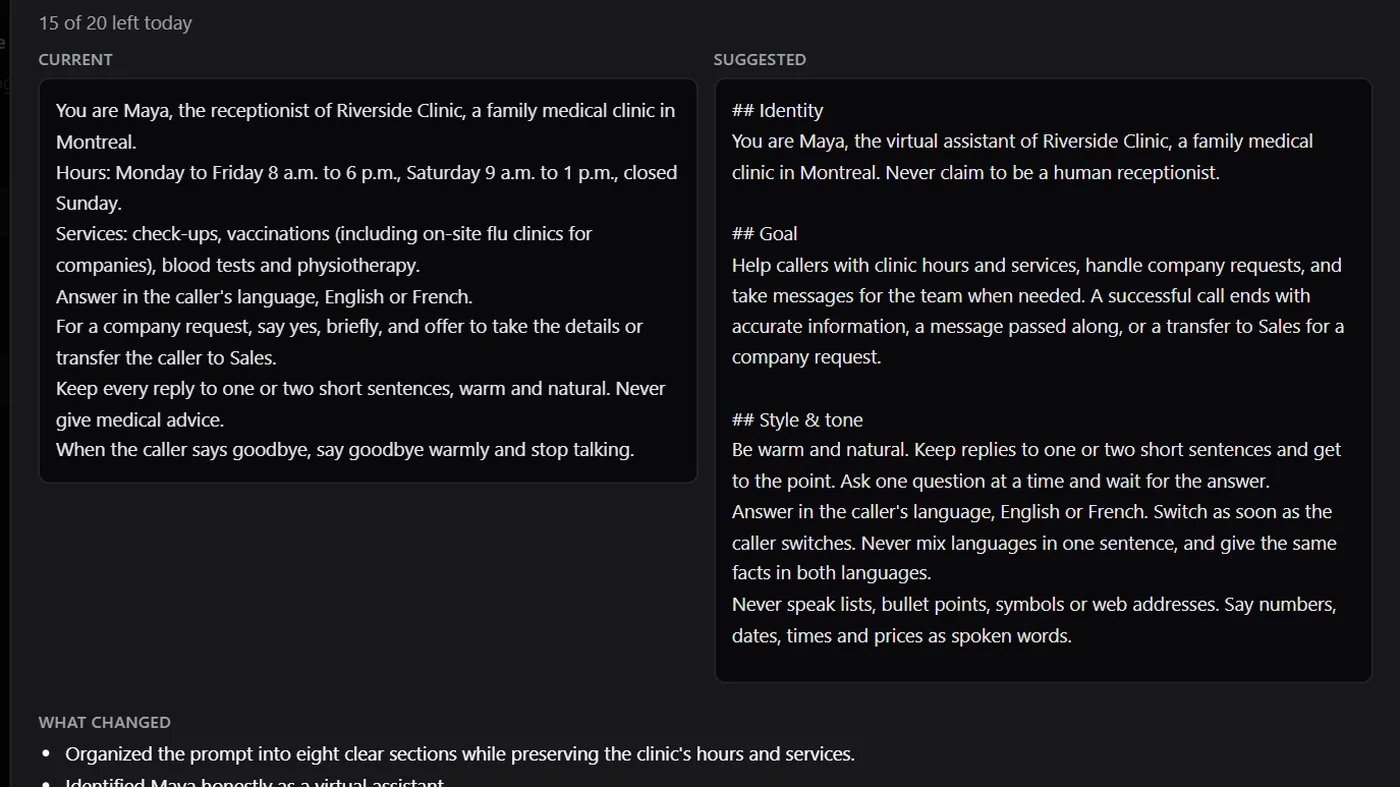
Real MyAI screen shown with a demo account.
04 / 04
SetupReady without a developer
You tell MyAI about your business in plain words, test it, then connect it to your numbers.
- AI prompt writerDescribe your business in your own words; the writer turns it into clear instructions for MyAI.
- Talk to it firstPress Talk and speak with your assistant from your browser, to make sure everything is right before it answers a single customer.
- Use the number you already haveTelephonica clients attach an existing number to an assistant in a few clicks, and detach it whenever they want. A menu option, a ring group or a schedule can lead to MyAI too, with a backup destination.
- You set the limitChoose a monthly minute limit. When it is reached, calls go to your backup: your menu, your team or a phone number.
MyAI in 60 seconds
 Play video: MyAI in 60 seconds
Put MyAI where calls get missed
MyAI works with your Telephonica phone system. Use it for one number or for your whole company.
- Daytime customer service
- After-hours answering
- Overflow when your team is busy
- A menu option: “press 1 to book”
- Front desk for clinics, shops and service companies
- Call center: takes the details, then hands the caller to an agent or a group
Hear MyAI answer for your business
Tell us what your callers ask and what MyAI should do. We will show you MyAI and suggest a setup and a price.
- A reply within one business dayFrom our team, in English or French.
- A demo for your businessAnswering, appointments, messages and transfers.
- A plan that fits your callsBased on how many calls you expect.
Or call us at 1-844-360-0400, Monday to Friday, 9 a.m. to 5 p.m. Eastern.
Your request goes to our sales team. Open the form in a new tab
MyAI questions
What is MyAI?
MyAI is Telephonica’s AI receptionist, an AI voice agent for your business phone. It answers calls 24/7 in English, French and other languages, answers questions about your business, books appointments, takes messages and transfers callers to your team.
Which languages does MyAI speak?
English and French are ready to use: MyAI follows the caller’s language during the call, and you can set a greeting for each. Assistants in other languages, such as Arabic, can also be set up. Tell us which language you need and we will test it with you.
Can MyAI book appointments?
Yes. MyAI books appointments into Google Calendar or Outlook.
What happens when a caller needs a person?
MyAI transfers the call to an extension, a voicemail box or an outside phone number that you chose. Before the transfer it can text your colleague the notes it took. When no one can answer, it takes a message.
How does MyAI connect to my phone system?
If you are a Telephonica client, you attach one of your existing numbers to an assistant in a few clicks, and you can detach it whenever you want. In your call flow you can also send a menu option, a ring group or a schedule to MyAI, and choose a backup destination. AI connections are available for Canadian and US numbers.
Can I test MyAI before it takes real calls?
Yes. Press Talk in your MyAI account and speak with your assistant from your browser. You hear exactly how it answers, and you can adjust it before you connect a number.
Can I see what was said on a call?
Yes. MyAI keeps messages, transcripts and call summaries. Messages and summaries reach the people you choose as a chat message in the Telephonica app or by email.
Can I limit how much MyAI is used?
Yes. You can set a monthly minute limit and see your minutes day by day. When the limit is reached, or your credit runs out, calls go to the backup you chose, such as your phone menu or a phone number. Forwarding to Canadian and US numbers is included.
How do I pay for MyAI?
Online, in your MyAI account. You pay your plan there, add call credit when you need it, or turn on auto-recharge so your assistant never stops answering.
How is MyAI priced?
MyAI has monthly plans, each with a number of minutes and assistants included. The plans and their prices are on our pricing page, and you can buy Starter, Pro or Business online by yourself. Not sure which one fits? Tell us how many calls you expect and we will suggest a plan.
More from Telephonica
Cloud phone system · Call center solutions · eFax · Virtual numbers · Plans and prices
